
The groundwork
The appeal is easy to understand, and because it does not require any technical knowledge it is easy for almost anyone to use, even for other gen-AIs. The issue I want to raise here is that I think it can produce bad work almost everywhere when it's applied like this, without any real constraints and structure.
Not because the models available are weak, and they are improving every few months, but because a real deliverable is the end of a long chain of decisions about materials, tolerances, budgets, clients, machines, workflows, applications, marketing and sometimes "vibes". Hand over the chain and you get something that looks like the answer without being connected to any of the reasons it needed to be that answer.
Ask for a product and it will give you a finished-looking thing that would most likely fall apart the moment it meets a manufacturing floor. Ask for a work of art and you will get a digital image that could look like art but lacks all of the ingredients that make it art. I think there is another way to use these tools, and it gets talked about far less because it isn't impressive in a screenshot.
Don't ask for the deliverable. Ask for the tools that help you make the deliverable yourself.
This is the first of a series of Field Notes about how I use generative AI in my work. Each one is a real project. In this one, I needed to reduce an embroidered patch design from an average of fifty colours down to ten. The way an LLM helped achieve this was not by designing anything itself, but by writing two short, crudely written scripts that let me organise and streamline the reduction process.
The vending machine problem
Watch how, generally, generative AI gets used and a pattern shows up quickly. The request is for a finished thing. Write me the copy. Generate the logo. Give me the script that does the whole job. The model returns something plausible, and because it's plausible and arrived fast, it gets used.
This works fine when the output is the whole thing and nothing downstream depends on it, or when the request is simple enough and carries little weight. This can be a first draft of an email, a name for a folder, a summary of a document you already understand. This method would fail when the output has to survive prolonged contact with the real world, because the model isn't holding any of the constraints that make an answer correct. It doesn't know the client rejected that colour last month, that the supplier's minimum order is 200 units, that the machine on the workshop floor only has ten needles.
Of course, these are all parameters and context that can be provided to the model, and a simple one-sentence prompt can become a seven-page instruction manual, but then the model isn't part of the process, it becomes the process. Suddenly, with every new parameter, a new prompt needs to be created, the model's memory updated, the context window increased. All of these are processes that drive token usage up and make a multi-step or multi-tool workflow even more complicated to maintain.
The deeper cost of this method is that the vending-machine habit quietly moves the interesting part of the work out of your hands. Deciding what should exist and how it should be implemented is where the expertise lives. Producing it is often just labour. When people complain about AI slop, I don't think they're objecting to a tool being used, they're objecting to work where nobody made decisions.
Ask for the tool, not the output
The alternative I keep coming back to is narrower and much less exciting. I do not want to automate the design process. I want to streamline it by automating the analysis process. I will be specific about what I mean, because automate and streamline are frequently conflated, and that is exactly how you end up shipping slop.
There is a version of this project where I hand the artwork to an image tool, ask it to reduce the palette to ten colours, and accept what comes back. It's faster than what I ended up doing. It also produces a worse patch every single time, because automatic quantisation generally reduces by pixel frequency while a patch reads by visual hierarchy. The thin ridgeline that defines a summit, for example, might occupy less area than any other colour in the file, but it is the one colour you cannot lose. A frequency algorithm will drop it without hesitation, and the output might look fine in a thumbnail but very wrong on a jacket.
What I needed wasn't a decision. It was a legible situation. Tell me what's in the file, tell me how much of it there is, and let me do the judging. This task is mechanical, tedious, requires no decision-making whatsoever, and it's very focused and specific. That makes it a perfect task for a computer to perform, and something that does not affect the final deliverable, which is a great opportunity to use an AI model.
The case study: fifty colours, ten needles
We're producing a collection of embroidered patches for the summits of Olympus. The full design process for each patch is documented in my works pages. As examples, you can read about the Mytikas, Skolio and Skala patch designs by following their respective links.
Here is the part that matters. An embroidery machine stitches with a fixed set of threads mounted at once. The one we use holds ten. That number isn't a stylistic guideline, it's physical; a needle either has a colour threaded through it or it doesn't. Every colour beyond the tenth has to be merged into a neighbour or removed.
The digital design file has no such limit. Working in Affinity Designer, gradients can get flattened, shapes are duplicated and recoloured, neighbouring shadows can have the tiniest variation in hue. By the time the design looks right on screen, the document can be carrying forty or fifty distinct fills, and a good number of them are near-duplicates that I created without noticing.
The first question is never "what colours do I remove?". It is "what am I actually working with?"
The tool that I use does not have an answer for that. There is no panel that reports every unique colour in a document, no usage count, no export of the hex codes at play. You can click through objects one at a time and read each colour swatch. On a detailed mountain illustration that's an afternoon of clicking, and you are still going to count wrong.
Why the SVG was the way in
I export these designs as SVG. An SVG file isn't really an image format. It's a text file. Kind of. Open one in any editor and you are reading XML, a markup language, where shapes declare their own colours like this:
<path d="M12 4 L20 18 L4 18 Z" fill="#2e5a3b" stroke="#1a1a1a"/>This fill="#2e5a3b" is the whole trick. This is the information that I am looking for, sitting in plain text, and the only thing making it hard to reach is volume. Thousands and thousands of lines and shapes, with a colour code buried in most of them.
This is the part of the problem worth scripting: mechanical, repeatable, well-defined, high-volume, zero judgement.
What I asked for: AKA the prompt
I know Python. I knew it could be done in Python. I am not fast enough at Python. Alone, I would have spent most of the day coding the logic, parsing edge cases and debugging, for a tool that I intended to run maybe thirty times and I needed the colour reduction really soon. It would have been an excellent learning experience, but it didn't fit the time constraints.
So I asked a gen-AI model to do it for me. The ask was simple but very strictly defined. Not a "help me reduce the number of patch colours in my design". That results in a 1500-word lecture and a follow-up prompt for a half-relevant script. The prompt was:
- Read an SVG file and walk every element in it
- Find every colour, wherever it hides (
fill,stroke, gradient stops, and inlinestyledeclarations) - Normalise them, so
#FFF,#ffffffandrgb(255,255,255)all count as one colour instead of three - Count how many times each unique colour appears
- Print a table sorted by count
That specification is the work. Every line of it comes from knowing the file format, knowing the manufacturing constraints, and knowing what the next steps in my workflow required. Gemini 3 Flash wrote the script in less than five minutes, and with a few tweaks I had a working tool that would have taken "solo me" an afternoon to code.
The script (for Python 3.12.0)
import xml.etree.ElementTree as ET
import re
from collections import Counter

def rgb_to_hex(rgb_str):
    """
    Converts an rgb string like 'rgb(255, 0, 0)' to HEX '#ff0000'.
    Returns None if the format is invalid.
    """
    match = re.search(r'rgb\((\d+),\s*(\d+),\s*(\d+)\)', rgb_str)
    if match:
        r, g, b = map(int, match.groups())
        return f'#{r:02x}{g:02x}{b:02x}'
    return None

def normalize_hex(hex_str):
    """
    Normalizes 3-digit hex codes (#fff) to 6-digit (#ffffff).
    """
    hex_str = hex_str.strip()
    if len(hex_str) == 4:  # e.g., #F00
        return '#' + ''.join(c * 2 for c in hex_str[1:])
    return hex_str

def extract_colors_from_svg(file_path):
    """
    Parses an SVG file and counts the frequency of every color found.
    """
    try:
        tree = ET.parse(file_path)
        root = tree.getroot()
    except ET.ParseError as e:
        print(f"Error parsing SVG file: {e}")
        return

    color_counter = Counter()

    # The attributes that can carry a colour
    target_attributes = {'fill', 'stroke', 'stop-color'}

    # Iterate all elements regardless of namespace
    for elem in root.iter():
        # 1. Direct attributes (e.g. <rect fill="#ffffff">)
        for attr in target_attributes:
            val = elem.get(attr)
            if val and val.lower() != 'none':
                process_color_value(val, color_counter)

        # 2. The 'style' attribute (e.g. style="fill: #ffffff; stroke: none")
        style = elem.get('style')
        if style:
            declarations = style.split(';')
            for decl in declarations:
                if ':' in decl:
                    prop, val = decl.split(':', 1)
                    prop = prop.strip()
                    val = val.strip()
                    if prop in target_attributes and val.lower() != 'none':
                        process_color_value(val, color_counter)

    return color_counter

def process_color_value(color_val, counter):
    """
    Cleans up a colour string and adds it to the counter.
    """
    color_val = color_val.lower().strip()

    final_hex = None

    if color_val.startswith('#'):
        final_hex = normalize_hex(color_val)

    elif color_val.startswith('rgb'):
        final_hex = rgb_to_hex(color_val)

    # Note: named colours (like 'red', 'blue') would need a mapping
    # dictionary: the 'webcolors' library handles this if you need it.

    if final_hex:
        counter[final_hex] += 1

def main():
    # --- CONFIGURATION ---
    input_file = 'your-design.svg'   # Replace with your SVG file path
    # ---------------------

    print(f"Processing {input_file}...\n")
    colors = extract_colors_from_svg(input_file)

    if colors:
        print(f"{'HEX Code':<15} | {'Count':<5}")
        print("-" * 25)

        for color, count in colors.most_common():
            print(f"{color:<15} | {count:<5}")

        print("-" * 25)
        print(f"Total unique colors found: {len(colors)}")
    else:
        print("No colors found or file read error.")

if __name__ == "__main__":
    main()
Two honest limitations
It counts occurrences, not area. A colour used once on a large background shape is one row; a colour used forty times on small scattered details is forty. The table tells you how many distinct colours exist and roughly how scattered each one is but it does not tell you how much of the patch each colour covers. That was fine here, because the number I was chasing was "how many colours am I over by", and the visual check came next. But it's worth stating rather than letting the table imply a precision it doesn't have.
It ignores named colours. fill="red" won't be counted, because handling named colours needs a lookup table. Affinity exports hex, so this has never come up for me. If your exporter emits names, the webcolors library covers it.
Neither of these is a flaw so much as a scope decision. The tool exists to answer one question quickly.
From HEX to colour
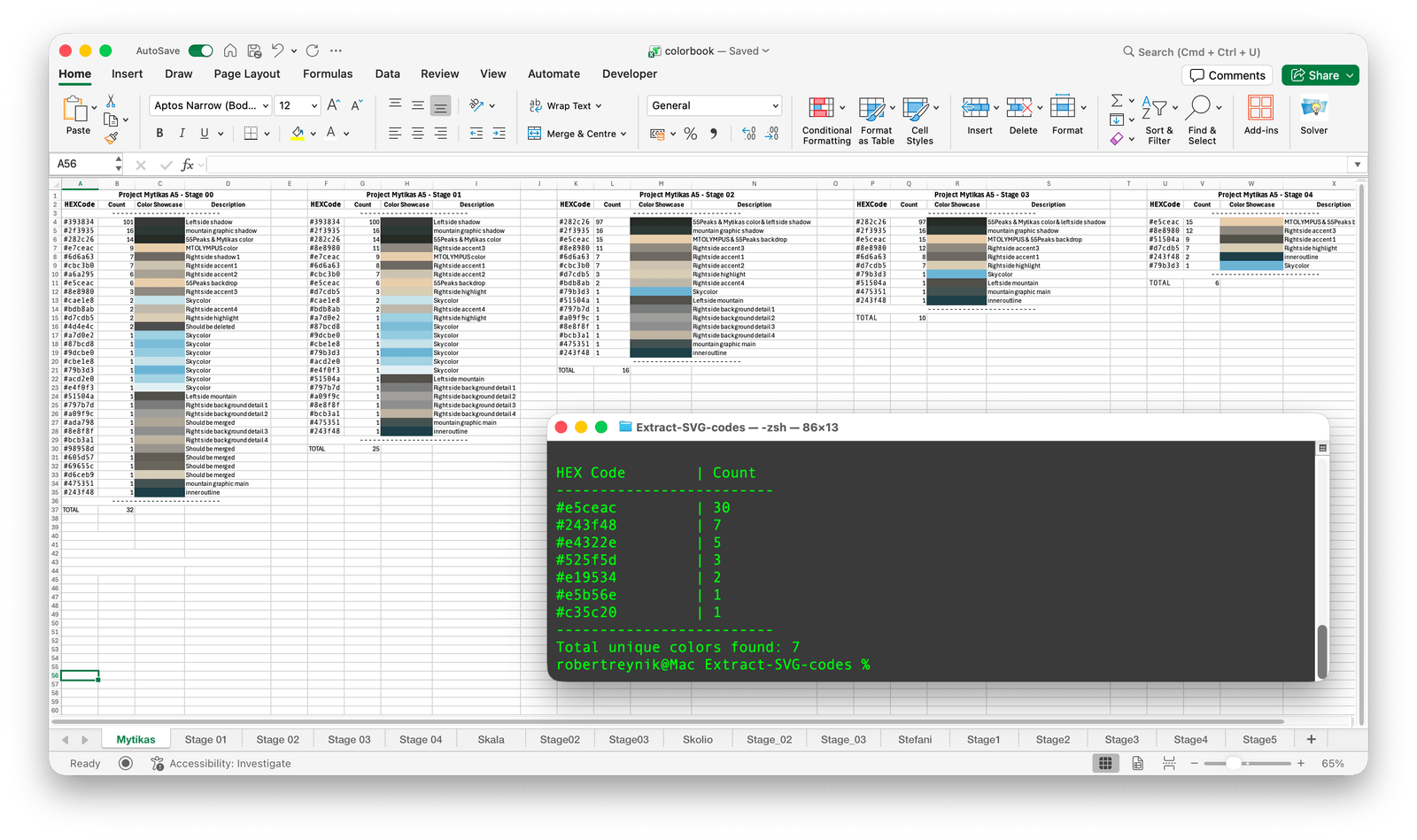
The Python script gave me a table with numbers and codes. #2e5a3b and #2f5c3d might be two distinct rows on that table and two different colours on the computer, but from a metre away on a backpack they are the same colour. You can't make merge decisions from a column of HEX codes any more than you can pick a paint from a list of serial numbers. At least, I can't.
I needed a way to render these codes. The quick answer would have been Python again. But at the time I already had an Excel workbook open for the designs, and both I and the client were familiar with the tool, so I went there instead. One workbook could hold every version of every patch's palette on separate sheets, with notes and a history I could easily scroll through. The tool you know beats the tool that's elegant, especially for something internal that realistically no one else will ever use.
Same model, different prompt: a macro for Excel that reads a HEX code from column A and fills the cell two columns over with the colour it represents.
The macro
Sub RenderHexColors()
    Dim ws As Worksheet
    Dim rng As Range
    Dim cell As Range
    Dim hexColor As String
    Dim r As Integer, g As Integer, b As Integer

    ' Work on whatever sheet is open
    Set ws = ActiveSheet

    ' Column A, from row 2 down to the last used row
    Set rng = ws.Range("A2:A" & ws.Cells(ws.Rows.Count, "A").End(xlUp).Row)

    For Each cell In rng
        ' Clean the string: remove whitespace and '#'
        hexColor = Replace(Trim(cell.Value), "#", "")

        ' Only act on a valid 6-character hex string
        If Len(hexColor) = 6 Then
            ' Split the hex into its three byte pairs
            r = Val("&H" & Left(hexColor, 2))
            g = Val("&H" & Mid(hexColor, 3, 2))
            b = Val("&H" & Right(hexColor, 2))

            ' Fill column C (two columns right of A)
            cell.Offset(0, 2).Interior.Color = RGB(r, g, b)
        End If
    Next cell
End Sub
It reads down column A until it runs out of rows, strips the #, splits the remaining six characters into three pairs, converts each pair from hexadecimal using VBA's &H prefix, and fills column C with the resulting RGB value. Column B stays empty as a gutter, it's where the count goes.
Same division of labour as before. I knew I wanted VBA, I knew the input and output columns, I knew conceptually what converting hex to Excel's colour value meant. What I didn't know was VBA's exact syntax for it, and I wasn't going to learn VBA that week for a fifteen-line procedure.
The result
One giant workbook, one sheet per reduction pass per patch. The workflow became: design, export, run script, paste, run macro. Under a minute, excluding the design phase, I knew where the design stood against the ten-colour limit. Seeing the palette laid out as fills made near-duplicates very easy to spot. Having a history of colours allowed me to efficiently decide, after merging near-duplicates, which of the two complemented the patch better. The version history also became a great method to communicate to the client how the reduction happened and what was removed. The conversation stopped being about whether the design had been compromised and became about which trade-offs we had made.
This last point was the most unexpected and deserves weight. The tool's most valuable output was not the colour reduction. It was the record of that reduction.
Where the model helped
I want to be direct about this, because in the field of design the unconstrained use of generative AI is prevalent and treated with a lot of suspicion and in a lot of cases, for good reason.
In this use case, the model wrote code. It did not know how the code would relate to the design process of the patches, how many needles the embroidery machine has, that near-duplicate greens are the failure mode to look for, or which single colour on a given summit carries the silhouette. It never touched the artwork. It never made a decision that shows up on the finished object. If you removed its use from this project entirely, the patches would be identical. They would have just taken longer to produce.
What it did was condense a day of fumbling around with code into under an hour, for two almost throwaway internal tools that will never be maintained, shipped or read by anyone but me. That, I think, is a very interesting category where this technology can earn its place: scaffolding around the work, not the actual work.
Ask for tools. Not decisions.
What I would do differently
The two-window workflow is a potential weak point. Python is run in the terminal, results are shown in Excel, with manual copy-paste between them.
I have been considering rebuilding it as a single standalone HTML/CSS/JS page, where you just drop the SVG file in, get the palette in both table and rendered form, save the iteration, and repeat until the final design with a simple export button for the client. Everything in one place, no back-and-forth copy-pasting, and it would run on any machine with a browser instead of needing Python installed. The current version works, and "works" matters a lot when the project needed to be finished that day.